Milometry
Vibration
Choose which moments make your phone vibrate in Milometry, one by one, or switch them all off.
Chapters
Transcript
General information, not advice. Written as general information on 29 September 2026. Details change, so check the official source or a qualified professional before you rely on it. This is not legal, tax or financial advice.
Milometry uses small vibrations to confirm things without you having to look: a trip landing in business or personal, a hold on the stop button, and a few others. You can keep the ones you like and switch off the rest.
1. Open Vibration
- Open the Settings tab.
- Tap Vibration. Its line underneath says Which taps you feel, one by one.
2. The master switch
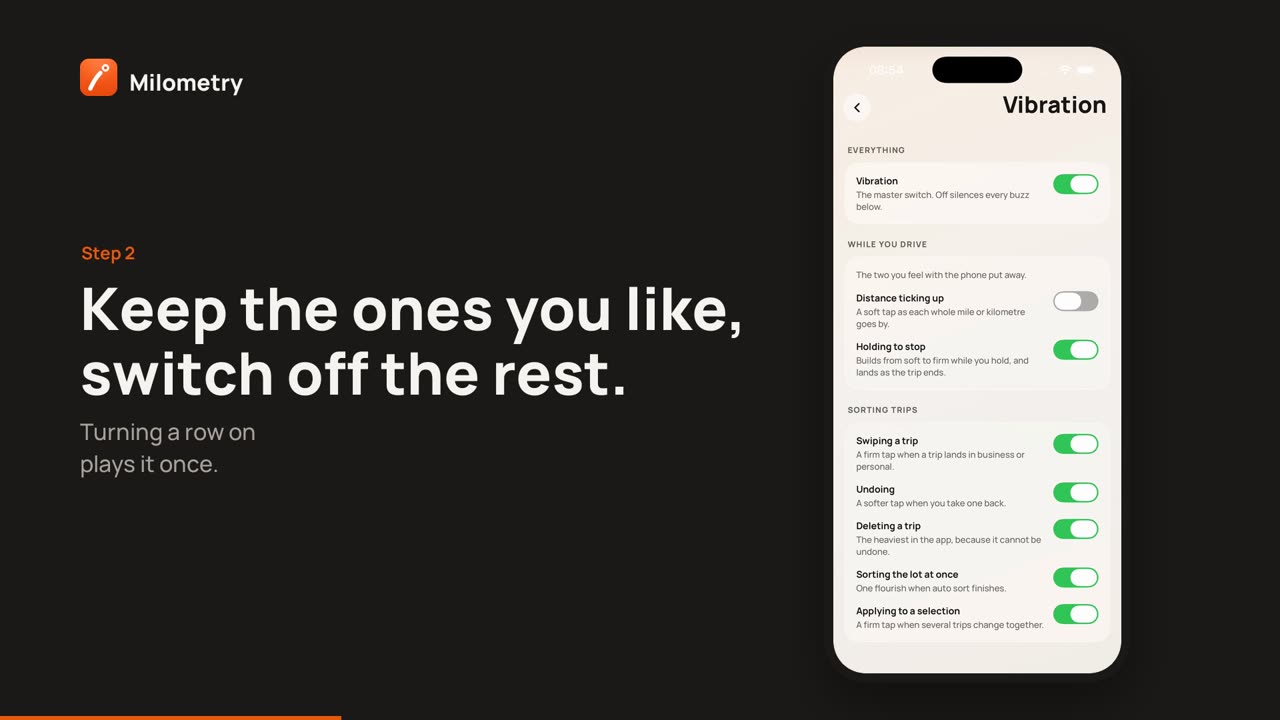
Vibration at the top is the master switch. Off silences every vibration in the list below it. On lets each row decide for itself.
3. One row per moment
The rows are grouped by when they happen. Switching a row on plays it once, so you know what it feels like before you keep it.
While you drive, the two you feel with the phone put away:
- Distance ticking up: a soft tap as each whole mile or kilometre goes by.
- Holding to stop: builds from soft to firm while you hold the stop button, and lands as the trip ends.
Sorting trips:
- Swiping a trip: a firm tap when a trip lands in business or personal.
- Undoing: a softer tap when you take one back.
- Deleting a trip: the heaviest in the app, because it cannot be undone.
- Sorting the lot at once: one flourish when auto sort finishes.
- Applying to a selection: a firm tap when several trips change together.
If something is not right
- Nothing vibrates. Check the master switch is on, then check your phone: on iPhone, Settings → Sounds & Haptics → System Haptics; on Android, your phone's vibration or touch feedback setting. Some phones turn vibration off in battery saving modes.
- The drive tick is too much. Switch off Distance ticking up and keep the rest.