Milometry
Adding a trip by hand
Add a drive the app did not record, from the Trips tab, a missed mileage card or a trip's return journey.
Chapters
Transcript
General information, not advice. Written as general information on 27 September 2026. Details change, so check the official source or a qualified professional before you rely on it. This is not legal, tax or financial advice.
Some drives never get recorded: the phone was flat, you borrowed a car, or you only started using Milometry last week. You can add any of them by hand in under a minute. A trip added by hand counts towards your mileage and your claim like a recorded one. It just has no route map.
1. Open the form
There are four ways in, and they all open the same Add trip form:
- From the Trips tab: tap the + button at the bottom right. This is the everyday way.
- From a trip you already have: open the trip and tap Add return journey. The form opens with the start and end swapped, the same distance, car, type and duration filled in, and the date of the trip there. Change the time to when you set off back.
- From the Insights tab: on the Unlogged mileage card, tap Add trip on a row. The missing distance and a date inside the gap are filled in for you. Fixing missed drives explains where that card comes from.
- From Missed drives: the Add button there adds the trip straight away, without the form, using the straight line distance.
2. Fill it in
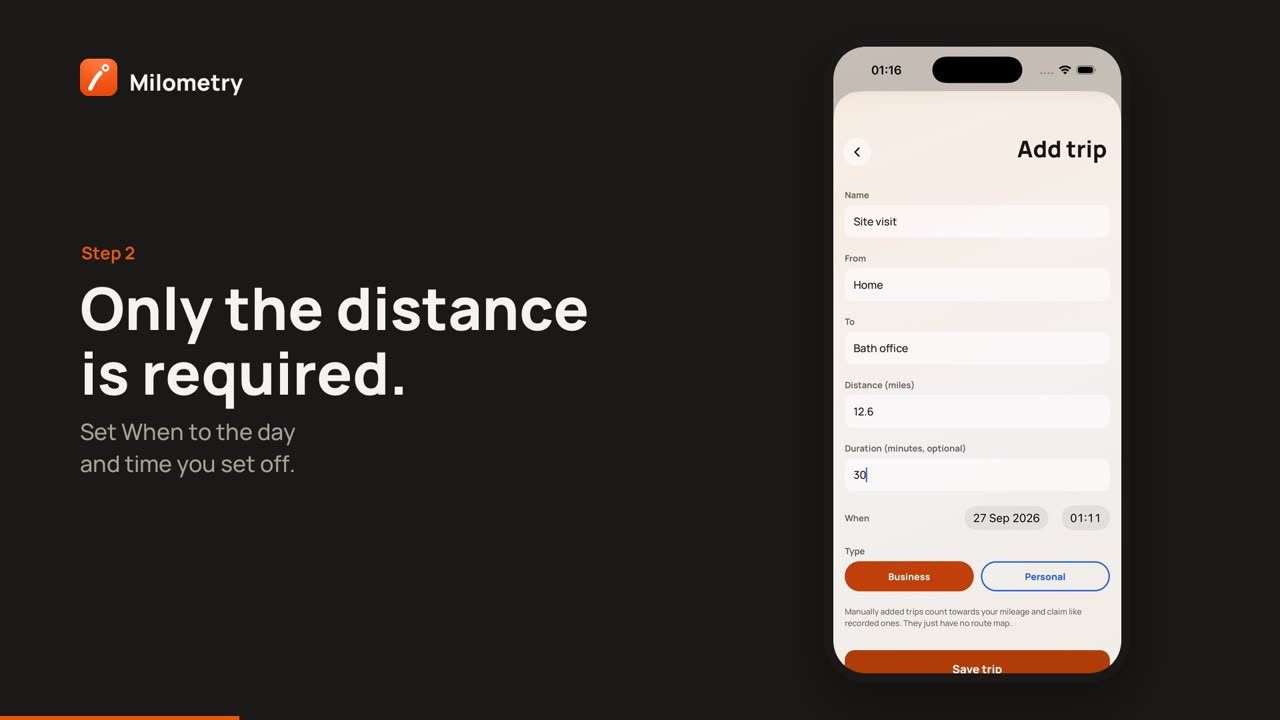
From the top:
- Vehicle, shown only if you have more than one car. Tap the one you drove.
- Name, optional, such as "Site visit".
- From and To, the places in your own words, such as "Home" and "Bristol office".
- Distance, the only box you must fill in, in the same unit as the rest of the app: Distance (miles) or Distance (km), depending on your mileage scheme. In versions before 1.1.0, it was always in miles.
- Duration (minutes, optional).
- When, the date and time you set off. The date cannot be later than today.
- Type: Business or Personal.
Tap Save trip. The trip goes straight into your log, already sorted, so it does not appear on the Classify tab. Its page says Added manually, no route recorded.
3. Get the distance right
Milometry has no route for a trip added by hand, so the distance is whatever you type. A route planner gives a fair figure for the road you took. If you log fill-ups with odometer readings, the Unlogged mileage card will tell you if your log still falls short.
If you claim mileage, keep a note of where the figure came from alongside the trip, in its name or notes, so you can explain it later.
If something is not right
- "Missing details". The distance is empty or zero. Enter the distance.
- The trip landed on the wrong car. Open it and pick the right car under Drove a different car? Pick the right one:.
- You chose the wrong type. Open the trip and change it to Business or Personal.