Milometry
Changing the language
Switch Milometry between English, French, Spanish, German, Dutch and Japanese, and why the language does not change your mileage rates.
Chapters
Transcript
General information, not advice. Written as general information on 29 September 2026. Details change, so check the official source or a qualified professional before you rely on it. This is not legal, tax or financial advice.
Milometry is written in six languages: English, French, Spanish, German, Dutch and Japanese. It starts in your phone's language if it is one of those, and you can change it at any time.
1. Choose a language
- Open the Settings tab.
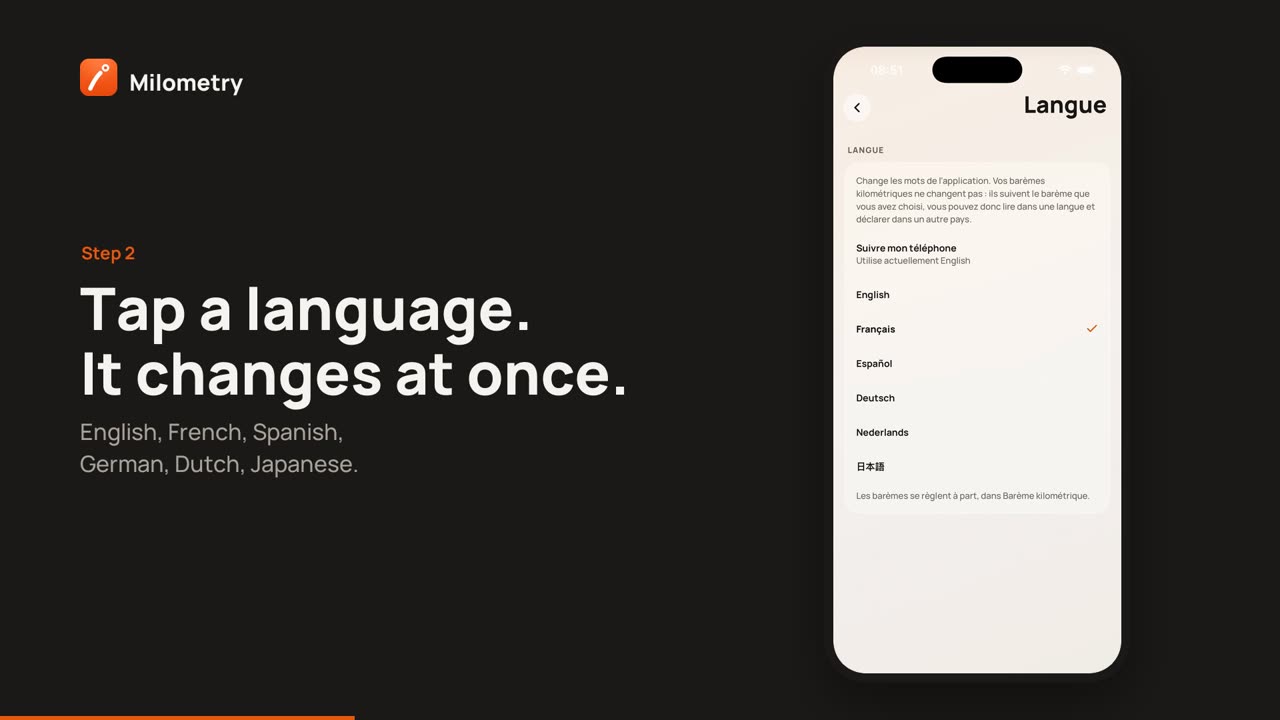
- Tap Language. Its line underneath says The words in the app, not the rates.
- Tap the language you want. The whole app changes straight away, with no restart.
Match my phone follows your phone's language setting instead. Underneath, it says which language that is using right now. If your phone is set to a language Milometry does not have yet, it uses English.
2. Your rates stay where they are
The language only changes the words. Your mileage rates, the tax authority, the currency and the units come from your Mileage scheme, which is a separate setting. So you can read the app in French and still claim at the HMRC rates in pounds and miles, or read it in English and claim in the Netherlands.
To change the rates, see Rates: your country, a custom rate, and your employer.
What else follows the language
- Reminders and recaps that were already scheduled are rewritten in the new language.
- Exports made from now on use the new language for their headings. A CSV exported in one language can still be imported in another: Milometry recognises its own column names in all six.
- Dates and numbers are written the way that language writes them, for example a decimal comma in French and German.
If something is not right
- Some words are still in English. The action names in the iPhone Shortcuts app and the steps in the diagnostics log are English in every language. Everything else should change; if you find a word that did not, tell us through Settings → Contact & support.
- The rates changed when I changed the language. They should not. Check Settings → Mileage scheme, which is where they are set.