 Milometry
Get Milometry
For iPhone, iPad and Android. Install it, add your car, and your next drive can record itself.


£9.99, once.
On a computer? Scan with your phone.
Open your phone’s camera, point it at the code for your store and tap the link that appears.


No account
Nothing to sign up for, no email, no password to leak.
No subscription
One payment through your store. Nothing renews and there is nothing to cancel.
Your log stays on your phone
No account, no server of ours, no analytics. Your log goes only where you point it. Place names and maps come from Apple or Google.
Refunds through Apple or Google
The store that took your payment handles refunds, under its own rules. Refunds and cancellation, in the terms
Your first few days with it
There is nothing to learn before you drive. These are the three screens you will use most.
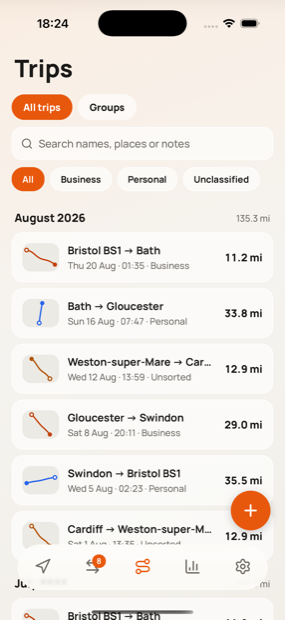
Drives record themselves
With Auto-record on, a drive starts when you leave where you parked and ends once you have been still for a few minutes. Each one lands in Trips with its route and distance.
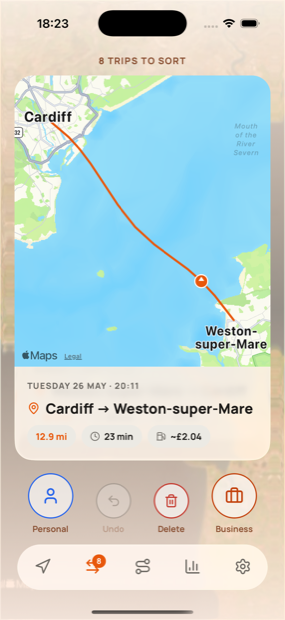
Sort them with a swipe
Once you have parked, swipe each new trip right for business or left for personal. Any swipe can be undone.
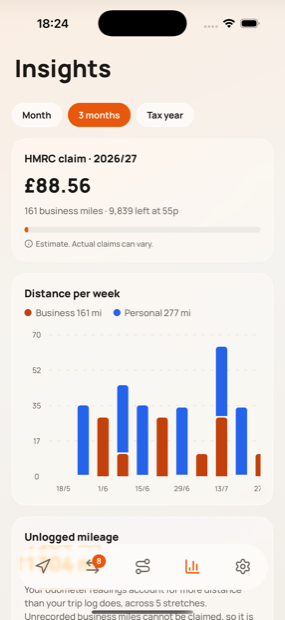
See the claim add up
Business trips are priced at the rates you chose, with the bands applied, and export as a statement or a CSV. Figures are estimates, not tax advice.


After you install
About five minutes, once. Everything else can wait until you want it.
Open it, choose your rules and add your car
The first time you open Milometry, it asks whose mileage rules to use and what you drive. A name for the car is the only thing you have to fill in.
Choose how drives start
In Settings → Tracking, pick Off, Remind me or Auto-record. We recommend Auto-record: it starts and stops by itself and needs nothing from you on the road.
Allow location all the time
Choose Always on iPhone, or Allow all the time on Android with precise location on. The app has to notice you leaving while it is closed, and only this permission lets it.
On Android, set battery to Unrestricted
Settings → Apps → Milometry → App battery usage → Unrestricted. Android puts apps it thinks are unused to sleep, and a sleeping app misses the moment you drive away. On iPhone there is nothing to do here.
Check the Android settingsDrive, then sort once you have parked
Drive as you normally would. When you have stopped somewhere safe, open the app and sort the new trips. Never while you are driving.
Automatic recording needs location set to Always and, on Android, battery set to Unrestricted. Some phones stop background apps anyway; the app warns you when that happens, and our Android guide shows the settings to check.
Read the full setup guide
What you need
A phone or tablet and the app store you already use. No account, and nothing else to install.
- iPhone and iPad
- iOS or iPadOS 16.4 or later, from the App Store.
- Android phones and tablets
- Android 7.0 or later, from Google Play.
- Languages
The app follows your phone’s language, and you can change it in Settings.
- Rules built in for
Anywhere else, set your own rate and Milometry totals the distance against it.
Questions before you download
Do I need an account?
No. There is nothing to sign up for: no email, no password and no account of ours. You buy and install it with the Apple or Google account already on your phone.
What does it cost?
£9.99, paid once. For scale, that is the approved amount for 19 business miles at 55p. There is no subscription, no account, no tiers and nothing to cancel. It was built because the mileage apps we tried wanted a monthly fee, an account or both, for something quite simple.
Will it wreck my battery?
It should not. GPS runs only while a drive is recording. Between drives the phone watches a ring around where you parked, and on Android an optional watcher uses the motion sensor, which is designed to cost very little. If you would rather it did nothing in the background, turn departure detection off and press Start yourself.
Can I bring my history from another app?
Yes. Export a CSV from your old app or a spreadsheet, then match its columns to Milometry in the import wizard. Duplicates of trips you already have are skipped.
What happens when I change phone?
Your log is stored on your phone, so you move it yourself. In Settings → Export & sync, save a full backup, then use Restore from backup on the new phone. If automatic export goes to a cloud drive or your own network drive, a full backup goes with it each time. Install the app again with the account you bought it with. A purchase on the App Store does not carry over to Google Play, or the other way round.
How do refunds work?
Apple or Google took the payment, so ask them first. On the App Store, use Purchase History or reportaproblem.apple.com. On Google Play, ask from your order history within 48 hours of buying; after that, email us and we can refund you through Google Play. If the app is faulty, email us and we will put it right.
Refunds and cancellation, in the termsStart counting your business miles.
£9.99 once, no account, and no analytics anywhere in it.
£9.99 once. No subscription, no account, no analytics.
General information, not advice. Written as general information on 27 September 2026. Details change, so check the official source or a qualified professional before you rely on it. This is not legal, tax or financial advice.