Milometry
The claim calculator
Work out what a journey is worth before you drive it, or how far you would need to drive to reach an amount, at the rate your next miles will actually earn.
Chapters
Transcript
General information, not advice. Written as general information on 27 September 2026. Details change, so check the official source or a qualified professional before you rely on it. This is not legal, tax or financial advice.
The claim calculator prices a journey at your mileage scheme's rates. What makes it more useful than a napkin is that it knows how many business miles you have already logged this tax year, so it uses the rate your next miles will really be paid at, not just the headline rate.
Every figure it shows is an estimate, not tax advice.
1. Open the calculator
Open Settings. Under Rates and claims, tap Claim calculator. The screen is called Calculator.
2. Choose which way round
Under Journey are two buttons:
- From distance: you know how far, and want to know what it is worth.
- From amount: you know how much you want to claim, and want to know how far you would have to drive.
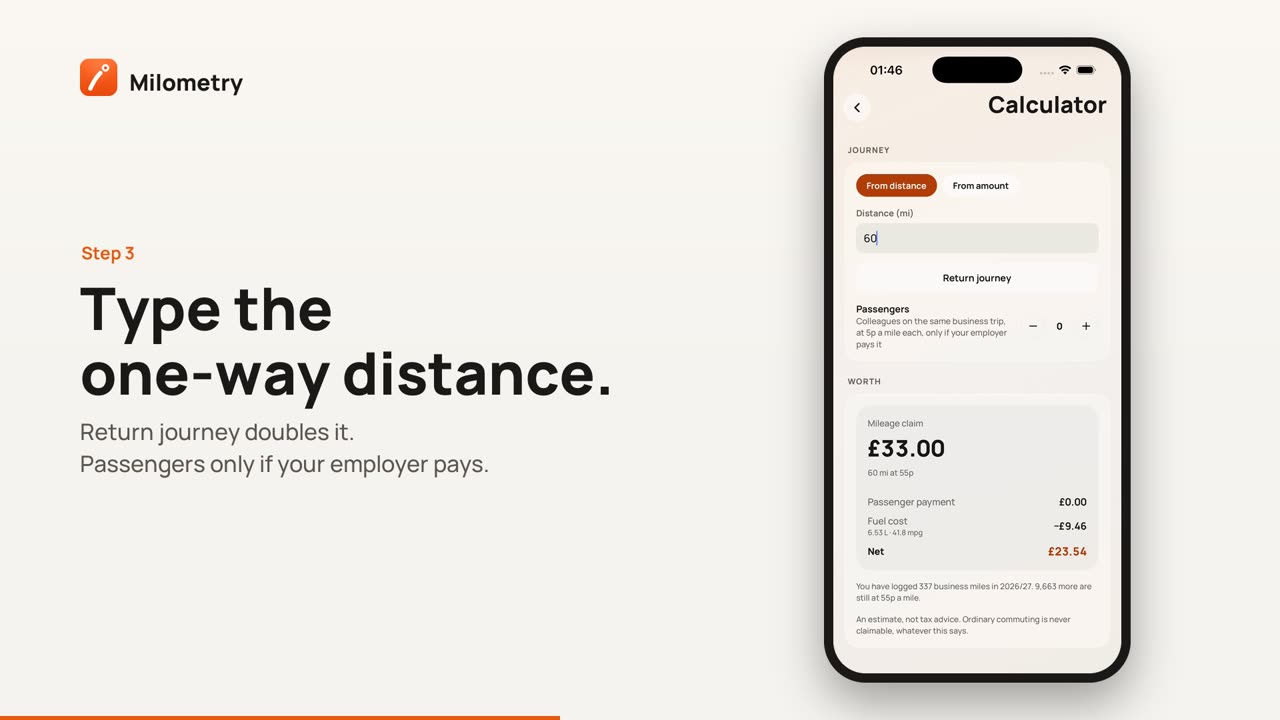
3. Enter the journey
With From distance, type the one-way distance into Distance (mi). With From amount, type the figure into Amount you want to claim (£).
Then set the extras:
- Return journey doubles a distance, or, with an amount, splits the distance across both ways.
- Passengers: use + and − to add colleagues on the same business trip. On HMRC rates each adds 5p a mile, but only if your employer actually pays it. If your employer does not pay it, you cannot claim tax relief for it instead.
- The car: with more than one vehicle, pick the one you will drive. It sets the fuel figure below.
4. Read the result
Under Worth, the headline is the Mileage claim (or, with an amount, the Distance needed). Under it, a line shows how the miles fall across the rate bands, for example "120 mi at 55p", or "80 mi at 55p, then 40 mi at 25p" if the journey crosses the 10,000 mile point.
Below that:
- Passenger payment: the passenger amount, if you added any.
- Fuel cost: what the fuel for the journey should cost, from your car's real MPG once you have measured it, or its stated MPG until then, and the fuel price from your last fill-up. If there is not enough to go on, it says Set a fuel price and log fill-ups.
- Net: the claim and passenger payment, less the fuel.
Under the card is a line telling you how many business miles you have logged this tax year and how many more are still at the higher rate. In the UK the higher rate covers the first 10,000 business miles of the tax year; after that every mile is at 25p.
What the calculator does not do
The calculator prices at the rates set in Settings → Mileage scheme. On the UK scheme those are HMRC's approved rates, currently 55p a mile for the first 10,000 business miles and 25p after. It does not ask what your employer pays you. If your employer pays mileage at a lower rate, the difference matters:
- The approved amount is your business miles at the approved rates.
- If your employer pays less than that, you can claim Mileage Allowance Relief on the shortfall.
- Relief reduces your tax. It is not a payment of the shortfall.
For example, 1,000 business miles at 55p is an approved amount of £550. If your employer paid you 30p a mile, £300, the shortfall is £250. At the basic rate of income tax (20%), relief on £250 is worth £50 off your tax, not £250. If your employer pays more than the approved rate, the extra is taxable.
If your employer uses its own rates, you can enter them as your scheme. Rates, country and employer shows how, and what changes when you do.
And whatever the calculator says, ordinary commuting between home and your normal workplace is not business mileage.
If something is not right
- The rate is lower than you expected. You are already past the first 10,000 business miles this tax year, so the next miles are at 25p.
- Fuel cost shows a dash. Set a fuel price in Settings → Fuel & fill-ups, or log a fill-up. See Logging a fill-up.
- The amount says Not reachable. The amount is more than any distance can reach at your scheme's rates, which can happen on a scheme with a yearly cap.
Sources
- EIM31240: approved mileage allowance payments, rates, HMRC
- Increasing mileage rates, HM Treasury and HMRC
- EIM31330: mileage allowance relief, HMRC
- Income Tax Earnings and Pensions Act 2003, section 233: passenger payments, legislation.gov.uk
- Claim tax relief for your job expenses: vehicles you use for work, GOV.UK
- Income Tax rates and Personal Allowances, GOV.UK
- Ordinary commuting and private travel (490, chapter 3), HMRC