Milometry
Working hours and travel hours
The "probably business" hint for weekday drives, and telling Milometry when you normally drive so everything else is recorded quietly.
Chapters
Transcript
General information, not advice. Written as general information on 27 September 2026. Details change, so check the official source or a qualified professional before you rely on it. This is not legal, tax or financial advice.
Milometry has two settings about time, and they do different jobs.
- Working hours is a hint when you sort. A drive on a weekday daytime gets a Working hours, probably business label, so the likely answer is in front of you.
- Travel hours is about recording. You tell Milometry when you normally drive, and outside those hours it still records, but quietly.
Neither one decides anything for you. Set them up once you have parked.
Working hours: the "probably business" hint
What it does
On the Classify tab, a drive that started between 08:00 and 18:00, Monday to Friday, shows a Working hours, probably business label on its card. You still swipe it yourself. Nothing is filed for you.
A saved place always wins. If the drive ended at a place you have tagged, the card shows that suggestion instead, because "it ended at the office" is better evidence than "it was 2pm on a Tuesday". See home, work and places.
The hours are fixed at 08:00 to 18:00 on weekdays in 1.1.0, in your phone's own time zone.
Turning it off
If you work shifts or weekends, the hint may point the wrong way more often than not.
- Open the Settings tab.
- Under Recording a drive, tap Tracking.
- In the Safety section, turn off Suggest business in working hours.
It is on for everyone to begin with.
Travel hours: record quietly outside the times you drive
When it matters
Travel hours only affect drives Milometry notices by itself, so they matter when Departure detection is set to Auto-record or Ask me afterwards (see choosing how Milometry records). If you only ever start drives yourself, you can leave them alone.
The typical reason to set them: you take the train on some days, and the phone leaving the station looks just like a car leaving the drive.
What happens outside your hours
Nothing stops recording. A departure outside your travel hours is still recorded, but:
- nothing is announced: no notification when it starts or ends, and nothing on the Lock Screen;
- a journey that looks like a train goes straight to the bin, where you can restore it;
- anything kept shows a Recorded quietly label on the Classify tab, so it is not forgotten.
The Track tab shows Outside travel hours until and the time they open again.
Setting your hours
- Open the Settings tab.
- Under Recording a drive, tap Travel hours.
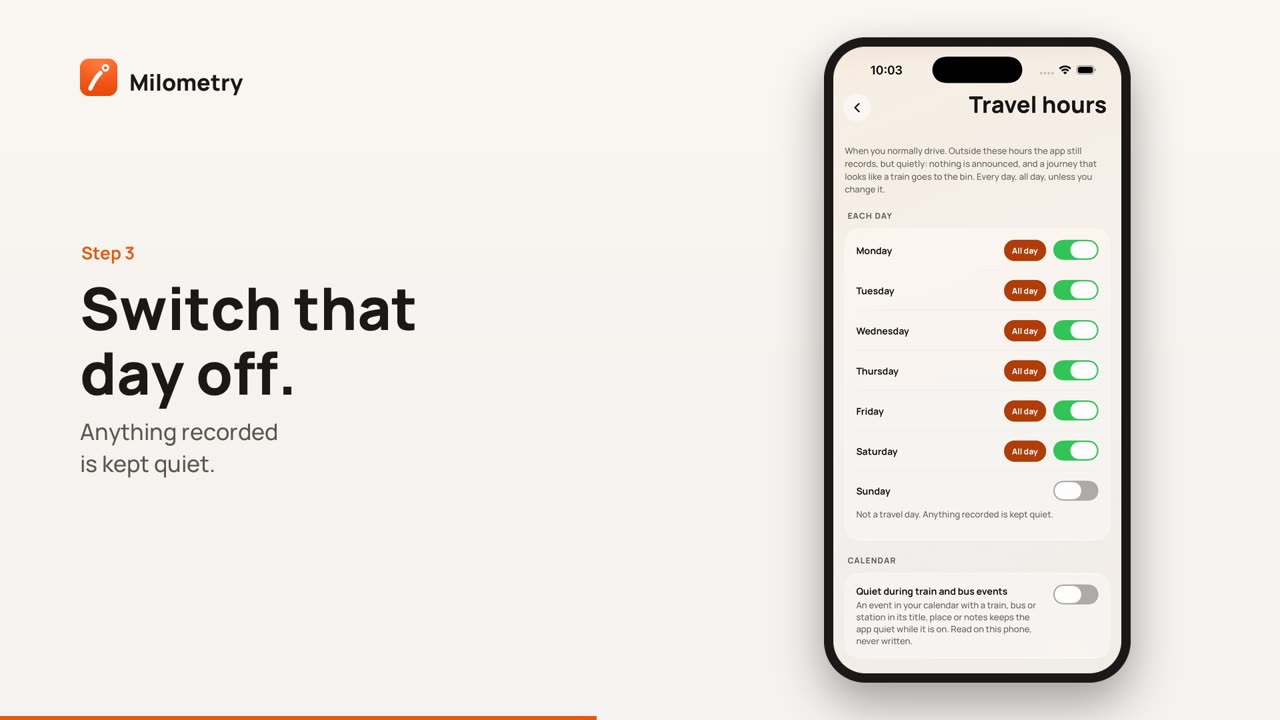
- Under Each day, every day starts switched on with All day highlighted. That is the default, and it means nothing changes.
- For a day you never drive, turn its switch off. It then says Not a travel day. Anything recorded is kept quiet.
- For a day you drive only part of the time, tap All day to turn it off. From and To times appear, starting at 09:00 and 17:00. Set them to your usual hours.
A window can run past midnight. Setting From 22:00 and To 06:00 is how a night-shift driver says "overnight".
To undo everything, tap Back to every day, all day under Start again. It only appears once you have changed something.
Driving outside your hours today
If you are driving on a day your travel hours say you are not, tap the quiet mode bell on the Track tab (it shows Outside travel hours until and a time) and choose I am driving today. The schedule is set aside until midnight, and drives are announced as normal. Do this before you set off, not on the move.
Calendar events for trains and buses (iPhone)
In 1.1.0 this option is on iPhone only.
- On the Travel hours screen, under Calendar, turn on Quiet during train and bus events.
- Allow calendar access when your iPhone asks.
While an event is on whose title, place or notes mention a train, a bus or a station, Milometry stays quiet, the same as outside your travel hours. Your calendar is read on the phone and never written to. If you turned calendar access down, Milometry says Calendar access is off; allow it in your iPhone's Settings and try again.
If something is not right
- A drive you made was not announced. Check the Track tab for Outside travel hours until. The drive was still recorded; find it on the Classify tab with the Recorded quietly label.
- A real drive went to the bin. Open the Trips tab, pick the Bin filter, and restore it. If that keeps happening on a particular day, widen that day's hours.
- Every weekday drive says probably business, and most are not. Turn off Suggest business in working hours as above, or tag the places you go so their own suggestion takes over.