Milometry
Trains, buses and quiet mode
What Milometry does when you are moving but not driving, and how to tell it in advance.
Chapters
Transcript
General information, not advice. Written as general information on 27 September 2026. Details change, so check the official source or a qualified professional before you rely on it. This is not legal, tax or financial advice.
Milometry notices you leaving the place you parked. In that first hundred metres it cannot tell whether you got into your car or onto the 07:42. So a train journey is recorded like any other, and without help it would land on the Classify tab asking to be sorted.
Two things deal with that. One you do, one the app does. By the end of this page you will know how to switch quiet mode on, set the hours you usually drive, and answer the app when it asks "Was that a train?".
1. Switch quiet mode on
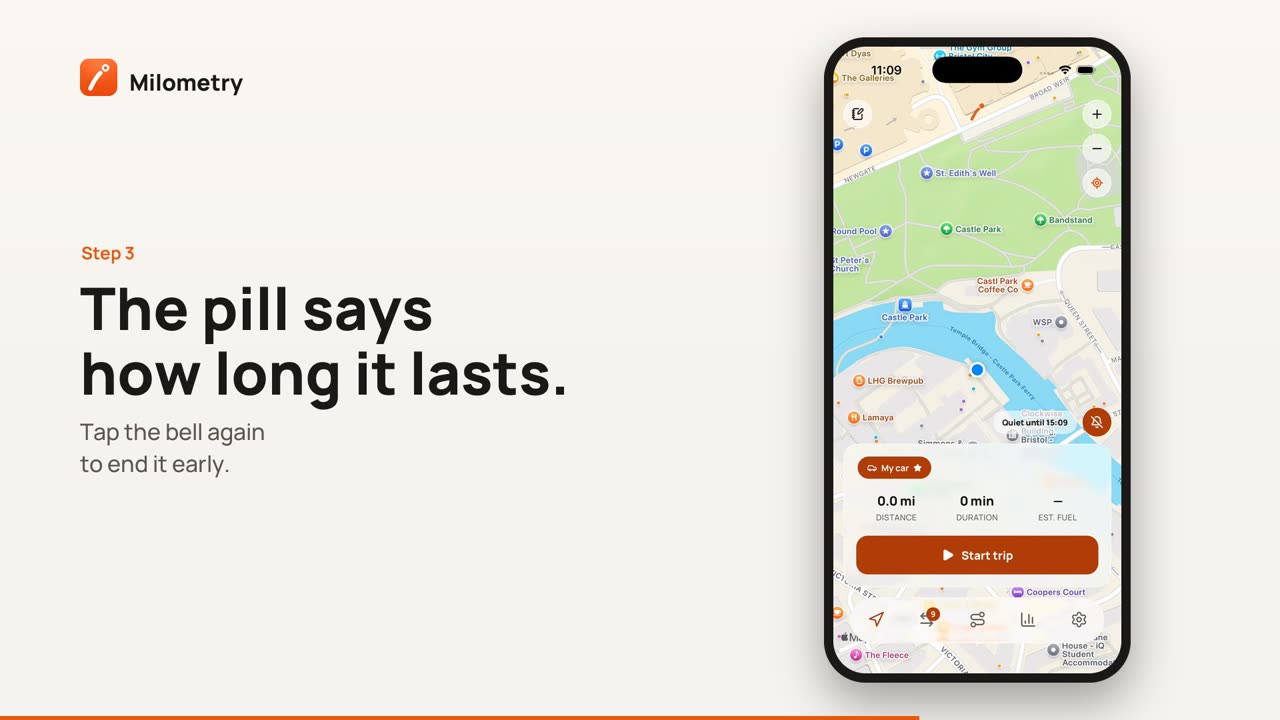
On the Track screen, tap the bell at the bottom right of the map. Choose For 4 hours, Until tonight or Until I turn it off. A pill beside the bell then says how long it lasts, for example "Quiet until 18:30".
While it is on, Milometry still records, but says nothing: no notification when a journey starts or ends, and nothing on the Lock Screen. On Android you still see the one notice Android itself requires while an app records in the background. The journey is saved with a Recorded quietly label, so it is still in your log if you forgot to switch quiet mode off, and anything that looks like a train goes straight to the bin.
To end it early, tap the bell again and choose Turn quiet mode off.
2. Or switch it on without opening the app
- By voice on iPhone: "Quiet mode in Milometry", or "I am on the train in Milometry".
- Long press the app icon and choose Quiet for 4 hours.
- The home screen widget has a Quiet 4h button beside Start trip.
Siri, Shortcuts and widgets covers setting these up.
3. Set your travel hours
Open Settings → Travel hours, or tap Travel hours at the bottom of the quiet mode sheet. There are seven rows, one per day, each with a switch and an All day toggle. Turn All day off and you get a From and a To.
Outside those hours every departure is treated as quiet. If you drive on weekdays and take the train at weekends, switch Saturday and Sunday off and you may never need the bell. To go back to the start, tap Back to every day, all day.
Driving on a day you usually do not? The pill by the bell says Outside your travel hours. Tap the bell and choose I am driving today, which sets the schedule aside until midnight.
4. On iPhone: let your calendar do it
Under Settings → Travel hours, the Calendar section has a switch: Quiet during train and bus events. Turn it on and allow calendar access when asked. An event with a train, bus or station in its title, place or notes then keeps the app quiet while the event is on. Milometry reads the calendar on the phone and never writes to it.
In 1.1.0 this option is on iPhone only. In versions before 1.1.0 it was also on Android.
5. Answer "Was that a train?"
Every saved journey is checked for the shape of a train or a bus. A car turns corners: out of the estate, round the roundabout, onto the slip road. Rail cannot. A car pulls away from the lights briskly; a train or a bus pulls away gently. A bus stops every few hundred metres for the whole route.
A journey that fits is flagged. On the Classify tab a banner says what it saw, with Bin it and It was a drive. If quiet mode was on, or the journey started or ended at a place you have tagged as a Station, it goes to the bin for you.
It learns from your answers. After five bins with nothing rescued, flagged journeys go straight to the bin. Two rescues in a row and it stops flagging. Nothing is deleted outright: the Bin filter on the Trips tab lists everything binned, each with Restore.
6. Tag your stations
When two flagged journeys have started or ended near the same spot, the Classify tab offers to tag it: tap Tag station. You can also add a station by hand under Settings → Locations. Departures from a station are quiet on their own.
What it can get wrong
A motorway drive that began on the motorway, with no corners before the cruise, can look like a train. A stop-start delivery round can look like a bus. Both are a question rather than a deletion, and answering It was a drive twice in a row turns the question off. A coach on the motorway is treated as a car on purpose, and a trip started from CarPlay, or on a car whose Bluetooth you have linked on Android, skips the check altogether.