Milometry
Home, Workplace and your saved places
Save the places you drive to, tag Home and Workplace, and let Milometry leave ordinary commuting out of your claim.
Last reviewed 27 September 2026. Figures for tax year 2026-27.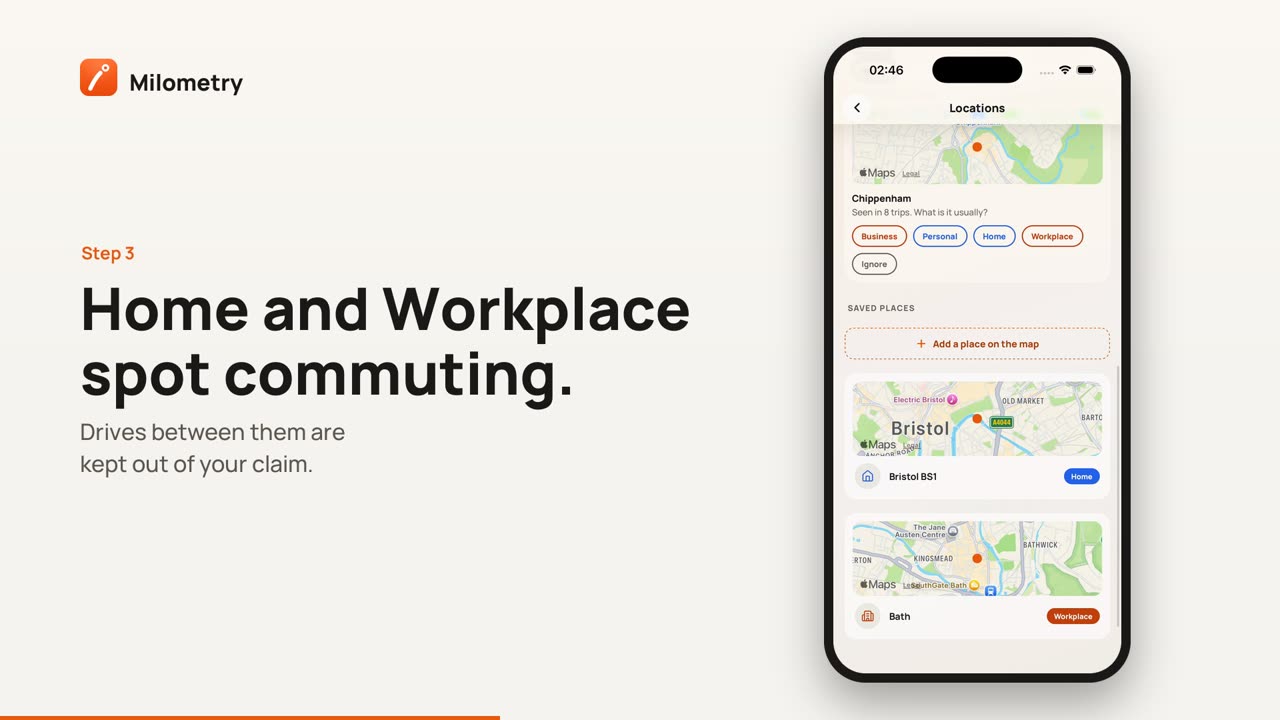
Chapters
Transcript
General information, not advice. Written as general information on 27 September 2026. Details change, so check the official source or a qualified professional before you rely on it. This is not legal, tax or financial advice.
A saved place is a circle on the map with a name and a tag. Trips that start or end inside the circle get that place's suggestion, so they sort faster. Two of the tags, Home and Workplace, also decide which drives count as ordinary commuting, which HMRC does not let you claim. Set them up once and your figure is both quicker to reach and easier to defend.
1. Open Locations
Go to Settings → Locations. There are two lists:
- Spotted in your trips: up to five places you keep going to, found from where your trips start and end. A spot shows up once three or more trips have started or ended there.
- Saved places: everything you have tagged, each with a small map.
2. Tag a spotted place
Each spotted place says "Seen in 4 trips. What is it usually?". Tap one of:
- Business
- Personal
- Home
- Workplace
- Ignore, which saves the place without an opinion so it stops being offered.
It moves to Saved places with a 150 m circle. Tap it there to rename it or change the circle.
3. Add a place yourself
- Tap Add a place on the map.
- On the Add place screen, tap the map to drop the pin, or drag it.
- Pick the size of the circle: 100 m, 150 m, 250 m or 500 m. Go bigger if you park in different streets around the same site.
- Give it a name. Notes are optional, and handy for a gate code.
- Under Trips here are usually, pick Business, Personal, Home, Workplace, Station or No bias.
- Tap Save place.
There is a shortcut for the two that matter most. While you have no home or workplace saved, the Classify tab shows "Save home and work, and drives between them sort themselves out." with Home and Work buttons. Each opens this screen with the tag already chosen.
4. What each tag does
| Tag | What it does |
|---|---|
| Business | Trips here are suggested as business. Use it for clients, sites and suppliers. |
| Personal | Trips here are suggested as personal. |
| Home | Trips ending here are suggested as personal. One half of the commuting check. |
| Workplace | Trips ending here are suggested as business. The other half of the commuting check. |
| Station | For a station you catch trains from: departures from here are recorded quietly, and journeys here that look like a train are binned without asking. |
| No bias | Keeps the name and the circle, suggests nothing. |
A suggestion is only a suggestion. You still swipe, or tap Auto-sort on the Classify tab. See sorting trips.
5. How commuting is left out
When a trip sorted as Business runs between a Home place and a Workplace place, in either direction, Milometry treats it as ordinary commuting:
- On the trip screen, Mileage at HMRC rates shows Not claimable, with a note saying why.
- It is left out of the claim figure on Insights, Year end, the statements and the claim PDF.
- It stays in your trips, so the log is still complete.
This is worked out fresh every time you look, not stored on the trip. Tag your office as Workplace today and every earlier drive between it and home is corrected at once. Change the tag back and they return.
6. Which places count as a Workplace
These are HMRC's rules for employees:
- Ordinary commuting is travel between home and a permanent workplace. You cannot get tax relief for it.
- A temporary workplace is one you go to for a task of limited duration or for a temporary purpose. Travel to it is usually allowable.
- A workplace stops being temporary if you work there continuously (40% or more of your working time) for a period that lasts, or is likely to last, more than 24 months. It turns on what is expected at the time, so a posting expected from the start to run for three years is permanent from day one.
So in practice:
- Tag your regular office or base as Workplace.
- Tag a client site, or a project you attend for a limited time, as Business, not Workplace.
- If a project that began as temporary is now expected to run past 24 months, talk to your accountant. A tag applies to every trip to that place, past and future, so Milometry cannot treat the early trips one way and the later ones another.
If you are self-employed, the tests for travel are different. Ask your accountant how to tag your base before relying on the figure.
If something is not right
- A commute still counts as business. Both ends have to sit inside a circle. Open the place and try a bigger circle, then check the trip again.
- A client site shows Not claimable. It is tagged Workplace. Change it to Business.
- You deleted a place by mistake. Deleting asks first ("Trips already classified are not affected."). Each trip keeps its Business or Personal answer. If the place was Home or Workplace, drives to it stop being treated as commuting until you save it again.
Sources
- Ordinary commuting and private travel (490: Chapter 3) (HMRC)
- EIM32075: temporary workplace (HMRC)
- EIM32080: temporary workplace, limited duration and the 24 month rule (HMRC)
- Income Tax (Earnings and Pensions) Act 2003, section 339: meaning of workplace and permanent workplace (legislation.gov.uk)
- Claim tax relief for your job expenses: vehicles you use for work (HMRC)