Milometry
Vehicle checks from the number plate
Open the official MOT, tax or registration check for your car from its vehicle screen, which countries have one, and what the official site receives.
Chapters
Transcript
General information, not advice. Written as general information on 27 September 2026. Details change, so check the official source or a qualified professional before you rely on it. This is not legal, tax or financial advice.
Once a car has its number plate in Milometry, its vehicle screen offers a link to the official government check for that plate, such as the MOT history in the UK. Milometry does not look anything up itself. It opens the authority's own page, so what you see is the official answer.
1. Open the vehicle
Open Settings → Vehicles and tap the car. To add a new one, tap the + button instead.
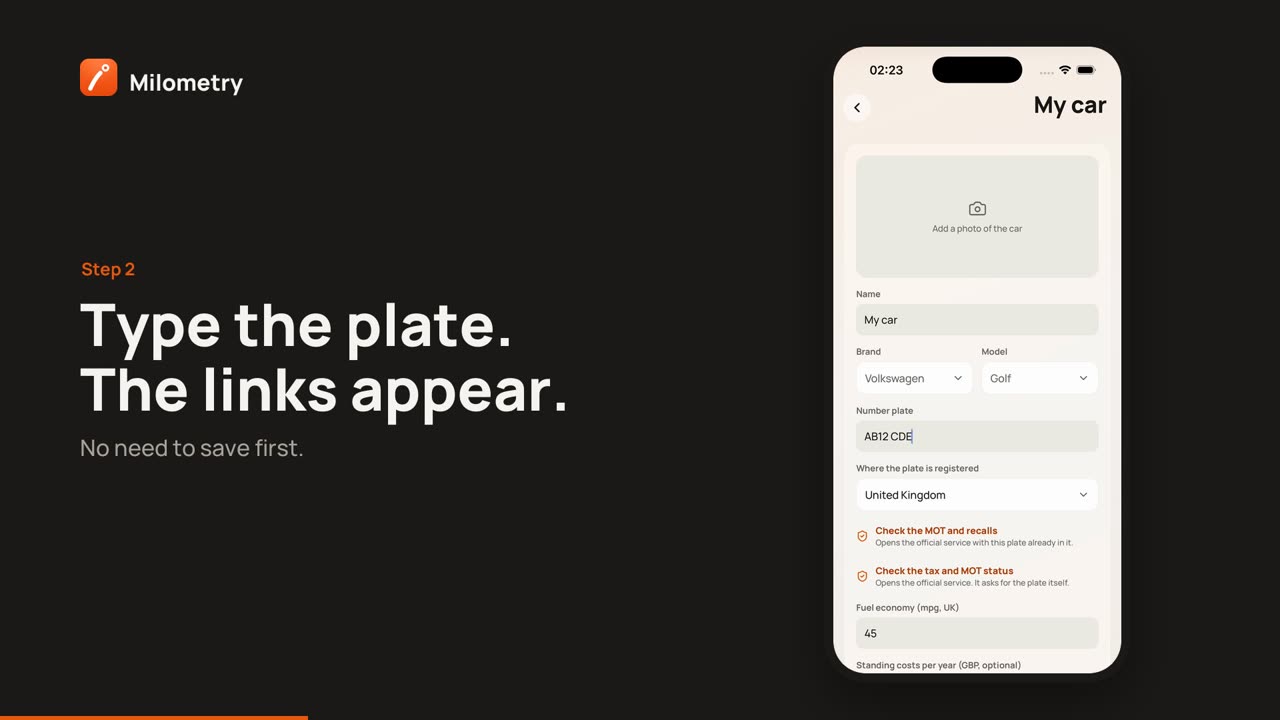
2. Enter the plate and where it is registered
- Type the registration into Number plate. It is shown in capitals as you type.
- Check Where the plate is registered. It starts on the country of your mileage scheme, which is usually right, but a car registered in one country can be claimed for under another country's rates. Tap it to choose another country. Countries with an official check are marked with a small shield.
3. Tap a check
As soon as there is a plate and a country with a check, one or two links with a shield icon appear under the country. Each says what it opens:
- Opens the official service with this plate already in it. The page opens with the answer ready.
- Opens the official service. It asks for the plate itself. The page opens on its own form, and you type the plate in there.
You do not need to save the vehicle first.
Which countries have a check
| Where the plate is registered | Link in the app | Opens |
|---|---|---|
| United Kingdom | Check the MOT and recalls | DVSA MOT history, plate filled in |
| United Kingdom | Check the tax and MOT status | DVLA vehicle enquiry, asks for the plate |
| Netherlands | Check the APK and details | RDW vehicle information, plate filled in |
| Ireland | Check and pay motor tax | Irish motor tax service, asks for the plate |
| Spain | Check the vehicle report | DGT free reduced report, asks for the plate |
| New Zealand | Check the WoF and registration | NZTA expiry check, asks for the plate |
| Australia | Check rego (Queensland) and Check rego (New South Wales) | each state's own check, asks for the plate |
Other countries have no link on purpose. For several of them, including Germany, France, Austria and Japan, there is no open official lookup by plate for the app to link to, because a plate is treated as identifying a person. The United States and Canada, like the rest of Australia, run checks state by state or province by province, so one national link would be wrong for most drivers.
What the official site receives
In 1.1.0, each check opens in your phone's own web browser, Safari or Chrome for example, not inside Milometry.
- For a check that fills the plate in, the registration is part of the web address, so the official site receives it as soon as the page opens.
- For a check that asks for the plate, the site receives nothing from Milometry but the visit. It gets the plate only if you type it in.
Either way, the site also sees the usual things any website sees, such as your internet address, and it may set its own cookies in your browser. That is between you and that site, under its own privacy terms. Milometry does not receive the result.
In versions before 1.1.0, the checks opened inside the app instead of in your browser.
If something is not right
- No link appears. Check the plate is filled in and Where the plate is registered is a country from the table above. For a country with no check, a line under the country says so.
- The page says the vehicle was not found. Check the plate for a mistyped letter or number, such as O and 0.
- The check is for the wrong country. Change Where the plate is registered. It does not change your mileage rates.