Milometry
Siri, Shortcuts and widgets
Start and stop trips, and switch on quiet mode, without opening the app: by voice, from the Home Screen or from a long press on the icon.
Chapters
Transcript
General information, not advice. Written as general information on 27 September 2026. Details change, so check the official source or a qualified professional before you rely on it. This is not legal, tax or financial advice.
Most drives record themselves. For the ones you want to start yourself, or the train journey you want kept quiet, you do not have to open Milometry. This page covers every shortcut in 1.1.0: Siri and the Shortcuts app on iPhone, Home Screen widgets and the Live Activity, and the long press on the app icon on both phones.
One rule runs through all of it. Your voice is the only hands-free way in. Everything else on this page, the widgets, the icon and the Shortcuts app, is for before you set off or once you have parked.
On iPhone: Siri
Milometry adds four actions to Siri. You do not need to set anything up. Say one of these:
- "Start a trip in Milometry", or "Start recording in Milometry"
- "Stop the trip in Milometry", or "Finish my trip in Milometry"
- "Quiet mode in Milometry", or "I am on the train in Milometry"
- "Log a fill-up in Milometry", which opens the app ready to log fuel, so save that one for the forecourt
Siri answers out loud, for example "Milometry is recording your drive." Starting and stopping happen without the app coming to the front. These actions need iOS 17 or later.
In 1.1.0 the Siri phrases are in English. If your iPhone's Siri speaks another language, use the Shortcuts app or the widget instead.
On iPhone: a Shortcuts automation for your car
If your car has Bluetooth but not CarPlay, an automation can start a trip every time the phone connects to it. Set this up at home, not in the car.
- In Milometry, open Settings → Tracking and scroll to Siri & automations. Tap Open Shortcuts.
- In Shortcuts, tap Automation, then the + button.
- Choose Bluetooth, pick your car's stereo and choose Is Connected. Set it to Run Immediately.
- Add the Start Trip action from Milometry and save.
- Make a second automation for Is Disconnected that runs Stop Trip.
The action names in Shortcuts are Start Trip, Stop Trip, Quiet Mode and Log Fill-up. If your car has CarPlay, you may not need this at all: Milometry on CarPlay can start recording when CarPlay connects.
On iPhone: Home Screen widgets
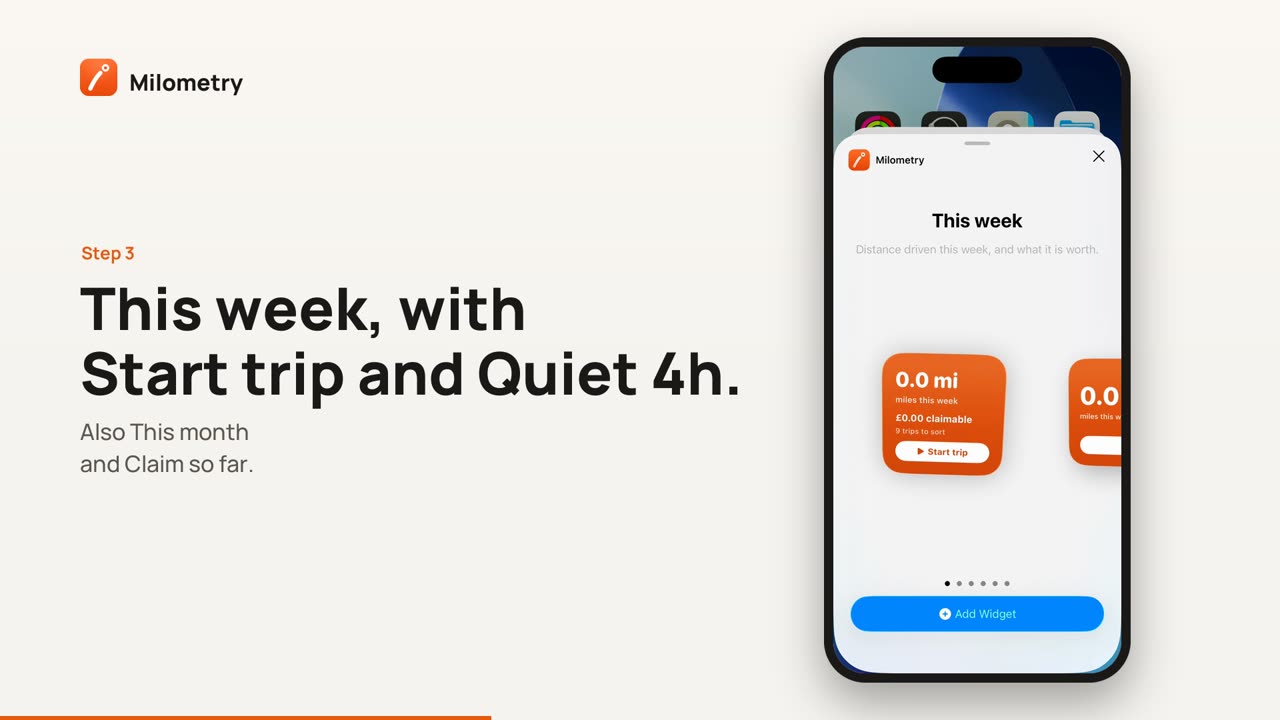
Touch and hold an empty part of the Home Screen, tap Edit, then Add Widget, and search for Milometry. There are three:
- This week: the distance this week and what it is worth. The small size has a Start trip button; the medium size adds Quiet 4h. While a trip records it shows a timer, the distance so far and End trip. It also comes in Lock Screen sizes.
- This month: the distance and claim so far this month.
- Claim so far: the estimated claim for the year.
The buttons work without opening the app, on iOS 17 or later.
On iPhone: the Live Activity
While a trip records, a Live Activity shows it on the Lock Screen and in the Dynamic Island: the distance and the time, updating as you go. For the first moments it says it is warming up the GPS, and it only claims to record once the signal is good enough. It has no buttons, so there is nothing to reach for. When the trip ends, it shows the distance saved and reminds you to sort the trip when you get a minute.
Quiet mode switches it off, along with every other announcement.
On Android: Home Screen widgets
Touch and hold an empty part of the Home Screen, tap Widgets and find Milometry. There are three:
- This week: the distance this week, business distance and claim. When nothing is waiting to be sorted it shows Quiet 4h and Start trip buttons; when trips are waiting, a count of trips to sort takes their place. While a trip records it turns orange, shows the distance so far and a Stop button.
- This month: the distance and claim so far this month.
- HMRC claim: the estimated claim for the tax year.
On Android, Start trip opens the app to begin recording, because Android does not let a widget start recording on its own. Stop and Quiet 4h work without opening it.
On both: long press the app icon
Touch and hold the Milometry icon. The menu includes Start trip and Quiet for 4 hours. On Android it can also include Log fill-up and Sort trips, depending on your phone.
If something is not right
- Siri says it cannot find the action. Open Milometry once after installing or updating, so iOS registers the actions, and check your iPhone is on iOS 17 or later.
- The widget buttons do nothing on iPhone. They need iOS 17 or later.
- The Bluetooth automation asks before it runs. Open it in Shortcuts and turn on Run Immediately.