Milometry
Fixing missed drives
How Milometry spots a drive it did not record, and how to add it back so your log is complete.
Chapters
Transcript
General information, not advice. Written as general information on 27 September 2026. Details change, so check the official source or a qualified professional before you rely on it. This is not legal, tax or financial advice.
Automatic recording works most of the time, and no phone gets every drive. A flat battery, an app that was closed, a drive you forgot to start by hand: any of them leaves a hole in your log. Milometry looks for those holes in three ways and offers each one back to you. Nothing is added until you say so.
1. Check the Missed drives screen
Open the Settings tab and tap Missed drives, under Your car and places.
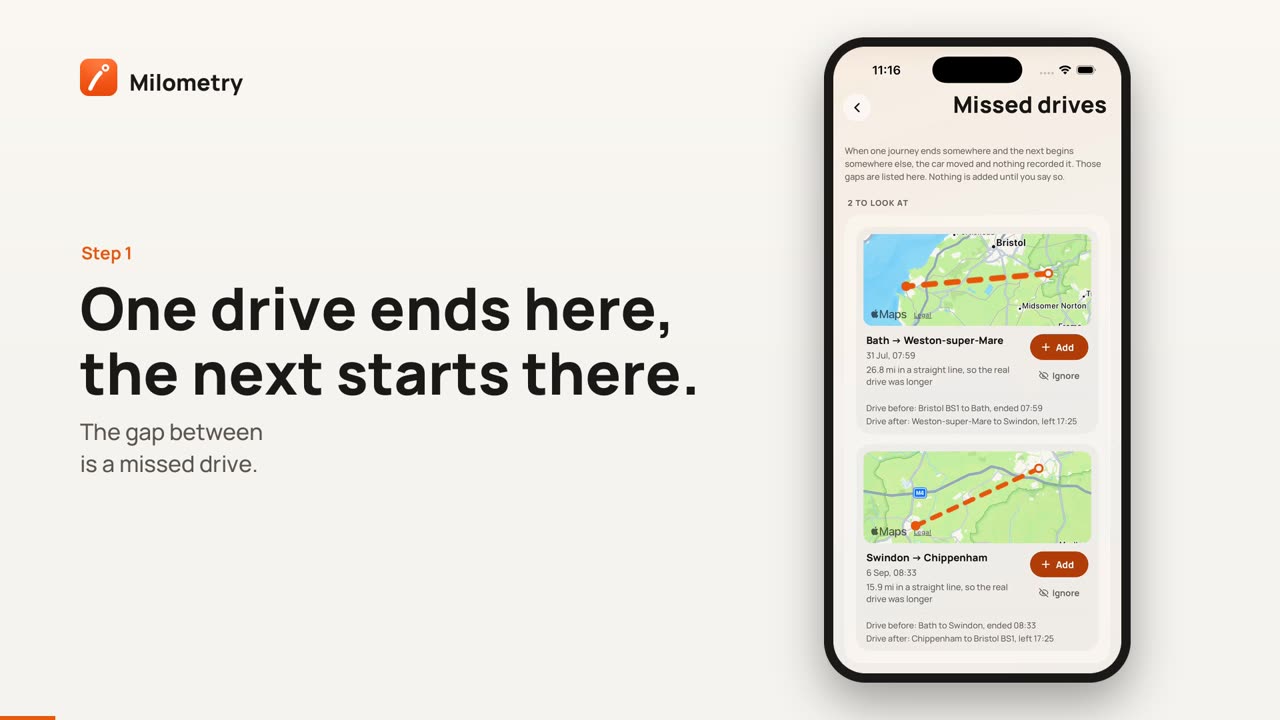
The idea is simple. Where one journey ended is normally where the next one began. When a drive ends in one town and the next starts in another, the car moved and nothing recorded it. Each of those gaps is a card:
- a small map with a dashed line between the two ends, dashed because nobody saw the road you took
- where the gap runs from and to, and the date and time
- the distance in a straight line, with a reminder that the real drive was longer
- Drive before and Drive after, the journeys either side, to help you remember what you were doing
If everything joins up, the screen says Everything joins up.
2. Add the drive back, or ignore it
Each card has two buttons:
- Add puts the missing drive in your log, timed between the two trips either side, with the straight line distance. It goes to the Classify tab to be sorted like any other drive. Once you have added some, a link at the bottom of the screen, such as Sort 2 added, takes you straight there.
- Ignore hides a gap that was never a drive of yours: the car went on a transporter, or someone else drove it.
The straight line is always shorter than the road. If you know the real distance, for example from a route planner, add the trip by hand instead with the right figure, dated between the two trips. The gap then disappears from the list by itself. Adding a trip by hand shows how.
3. Let the odometer check your log
The second check uses fill-ups. When you log a fill-up, fill in Odometer (miles, optional) as well. Between two fill-ups with a reading, Milometry compares how far the odometer moved with how far your trips add up to.
If the odometer shows noticeably more, at least 15 miles and a real share of the distance, the Insights tab shows an Unlogged mileage card with the missing distance and the dates. Tap Add trip on a row and the trip form opens with the missing miles and a date inside the gap already filled in. Check them, choose Business or Personal, and save.
This catches drives the first check cannot, because it does not care where the drives began and ended.
4. When the app was closed mid-drive
If Milometry is closed while a drive records, for example swiped away or stopped by the phone, a notification arrives a few minutes later: Trip recording stopped. It says the app was closed and asks you to open it once you have parked. Leave it until then.
When you open Milometry, it shows Unfinished trip with three choices:
- Carry on recording, if the drive is not over yet
- Save trip, to keep what it recorded up to that point
- Discard, if it was not a drive worth keeping
The part of the drive after the app closed is not in that trip. If your next drive then starts somewhere else, the missing stretch will usually show up on the Missed drives screen.
This notice is not sent while quiet mode is on.
What these checks cannot find
- A round trip. If you drove out and came back to the same place and none of it was recorded, both ends join up and there is no gap to see. Only the odometer check can catch it, and only if you log fill-ups with readings.
- Short hops. Ends less than 500 metres apart are treated as parking round the corner, not a missed drive.
- Long absences. Gaps of more than a week, or more than 1,000 km apart, are left out: the car may have moved several times, or been carried on a ferry.
- Older history. The screen looks at your most recent 200 trips.
If you find yourself adding drives back often, the cause is usually a phone setting. On Android, see Make sure Android records your drives. On iPhone, see iPhone location and background.